At a client recently, I was tasked to create an inventory of all the Active Directory Groups that give access to a SharePoint site! I built it mostly from scratch, so here it is as well as some explanations to help you use it:
function WriteLogs ($message) {
$message | Out-File $logfile -append
}
$logfile = “C:ADGroupInventorygrouplist.txt”
Write-Host “Starting Group Script inventory”
$was = Get-SPWebApplication
foreach ($wa in $was)
{
$webappUrl = $wa.url
Write-Host “Starting to look in $webappUrl”
$spWebApp = Get-SPWebApplication $wa.url
foreach($site in $spWebApp.Sites)
{
$siteurl = $site.url
Write-Host “Going into SiteCollection $siteurl”
$group = $site.RootWeb.SiteUsers
foreach ($grp in $group)
{
Ensure the item is a domain group
if($grp.IsDomainGroup -eq “True”)
{
$groupname = $grp.name
WriteLogs “$groupname”
}
}
}
}
- First of all, change the $logfile variable to a folder that exists to make sure the logs work.
-
Second, in the Central Administration, give yourself “Full Control” in the Web Application User Policy. This will make sure that you won’t have any access denied when you go through each and every site collection in your farm.
-
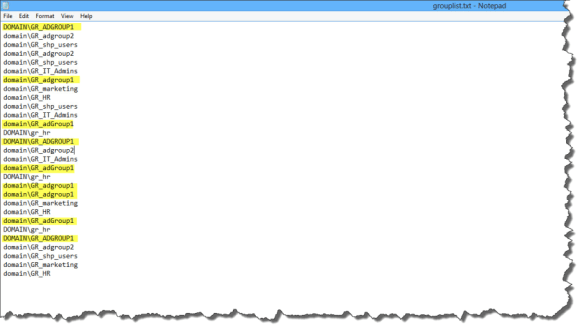
Afterwards, open SharePoint Management Shell as an Administrator, and run the script. Depending of the size of you farm, it shouldn’t take too long, and you should see progress of every site being scanned on the screen. At the end, you will have a text file looking like this:
PowerShell
You will notice in the screenshot that some group names are repeated, as well as some of them are in capital and some of them are lowercase.
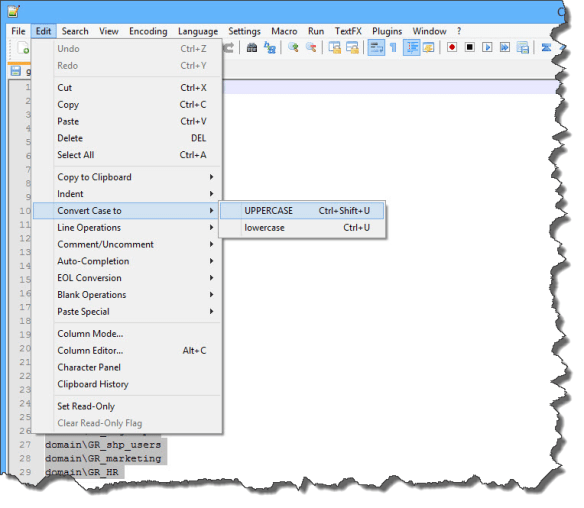
- So, I used NotePad++ to get all the unique group names!
First of all, go in Edit > Convert Case to > Upercase!
You will notice in the screenshot that some group names are repeated, as well as some of them are in capital and some of them are lowercase.
get all the Active Directory groups in your SharePoint Farm
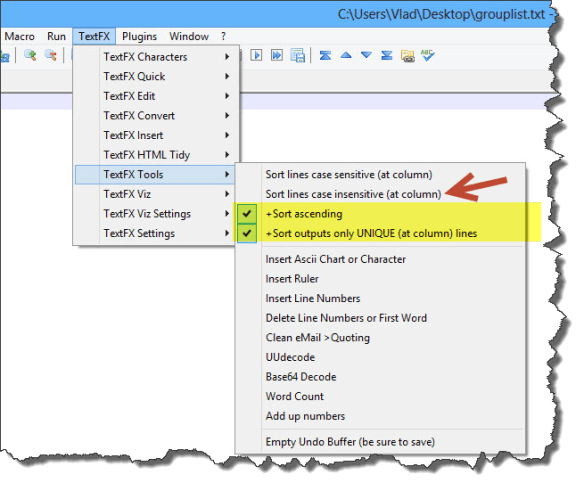
To get unique lines, you will need the TextFX plugin. This used to be included in older versions of Notepad++, but if you have a newer version, you can add it from the menu by going to Plugins -> Plugin Manager -> Show Plugin Manager -> Available tab -> TextFX -> Install. In some cases it may also be called TextFX Characters, but this is the same thing.
After the plugin is installed, go in TestFX Tools and check the “sort ascending” and “sort outputs only UNIQUE” lines. Afterwards, click the “Sort lines case insensitive at column”. (make sure that you do Ctrl+a in the file to select all the lines before clicking).
get all the Active Directory groups in your SharePoint Farm
Now, your Notepad++ will only show the unique group names in your SharePoint Farm!

get all the Active Directory groups in your SharePoint Farm
Drop a comment if this helped!