There is crawling error in the Craw log of a SharePoint 2013 environment.
Processing this item failed because of an unknown error when trying to parse its contents. (Error parsing document ‘http://sharepoint.contoso.com/Project/abcd/Q_M/ABX/SitePages/Homepage.aspx’. Sandbox worker pool is closed.; ; SearchID = 820E86ZD-5252-4G5F-AK9U-2096ZV3L56PP )
In order to fix this you can try to perform the following action plan:
Open “Local Policies”
Click on “User rights assignment”

User rights assignment in local security policy
Make sure that the search service account has the following rights:
“Replace a process level token”
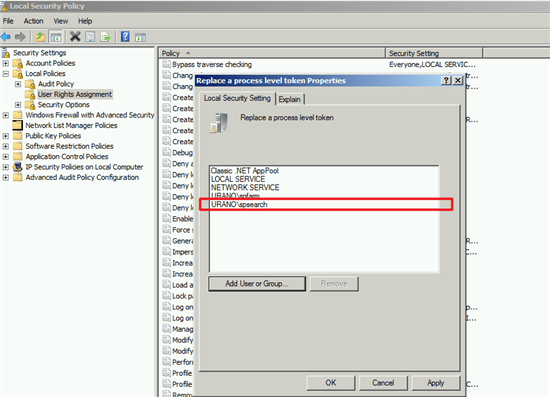
Replace Process Level Token Properties
“Adjust memory quotas for a process”

adjust memory quotas process properties securitypolicy
“Impersonate a client after authentication”

Impersonate client authentication properties security policy
Please make sure that the policies don’t get changed afterwards.
After implementing the above changes please run a clear configuration cache
After clearing the cache, start a full crawl and the errors should be gone.