Send your resume, I can give Job referral for SharePoint Administrator Position. Mandatory to put comment on the point “Can you join the company with in 20-30 days (Yes/No)”. Early joiners will be preferred most.
Can you join the company with in 20-30 days (Yes/No) ?
There was an issue in microsoft word web app can’t open this document “Sorry,we can’t open this document because there was a problem talking to the service”
Farm Information:
Web Application published internally and externally (so make sure both URLs added to Alternate Access Mapping)
Office Web Apps 2013 (Published externally via TMG 2010 and internally)
I have a farm which connected to Office Web Apps 2013 and It’s working fine internally so then we decided to enable it to open Office Web Apps externally by the following steps :
1- In Office Web Apps Server , Open Power Shell and run this command to add the External URL to existing Farm:
403 forbidden error fix done. Received below error while browsing SharePoint web app.
The website declined to show this webpage
HTTP 403
Most likely causes:
This website requires you to log in
if we create a copy of the web.config file, rename the web.config file, refresh the home page, we receive an “HTTP 404 – Page Not Found” error.
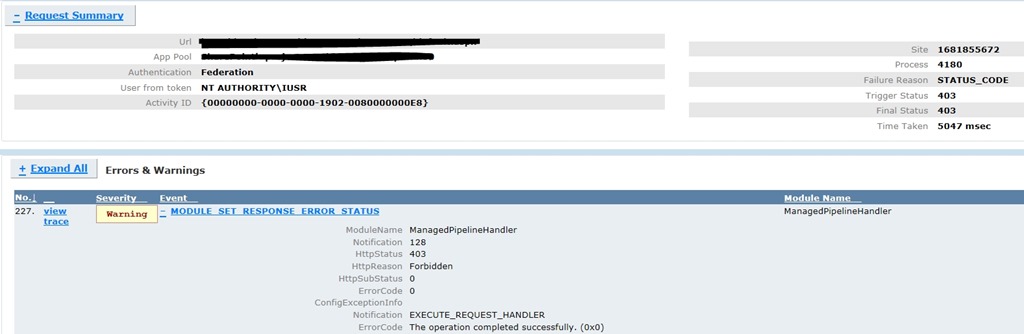
Rename the web.config file back and refresh the page. The site is browse able for a while before failing after some time, We see the following error in Failed Request Tracing.
A procmon trace captured while accessing the web app from the server showed the following:
This issue usually occurs when a request from an authenticated user without local admin rights results in a failed read of the /BIN directory by the impersonating w3wp.exe (IIS worker process for ASP.NET) process.This behavior is typically associated with lack of permissions to the temporary folder /BIN where ASP.Net assemblies are Just In Time (JIT) compiled.
Resolution
The solution is to ensure that the Authenticated Users or \Users group (which usually contains DOMAIN\Users group) has Read & Execute, List Folder Contents and Read permissions on the /BIN folder below
Follow the steps below to grant the required permissions:
Open Windows Explorer and navigate to the /bin directory of your web application
Right-click on the folder and click on Properties
Go to Security tab and click on Edit
Click on Add and add the local server group Authenticated Users or \Users (this usually contains DOMAIN\Users group).
Select the Read & Execute, List Folder Contents and Read permissions (if you are planning to add Everyone to the /bin folder, grant Read permissions only)
Click OK to apply the new settings
Refresh the page and we should be able to browse to the site.
More Information
If an administrator accesses the site/feature that caused the error, the subsequent requests from non-administrators would succeed. This behavior is typically associated with lack of permissions to the temporary folder where ASP.Net assemblies are Just In Time compiled.
The freb trace shows a 403.0 for ManagedPipelineHandler
It seems to go through quite a few ASPNet events – but happens during the ASPNetPageRender – it goes to the ASPNetPageRender Enter, then ASPNetHTTPHandler Leave.Only then does it get a 403.0 which is not an official RFC error. The first sub-status for 403 is 403.0.
Application pool in Classic or Integrated mode
Application Pool in Classic Mode – In this case, we can configure a Wildcard mapping for ASPNET_ISAPI.dll at the website level. That would propagate to child virtual directories. That should not need any further modifications at the virtual directory level.
Application Pool in Integrated Mode – In this case, all relevant virtual directories would need individual modifications. They need to be set for specific handler.