Display template SharePoint Server 2013

Display templates for the Content Search Web Part

You can use the following Display template SharePoint to change the appearance of content that is shown in a Content Search Web Part. These display template files are located in the Content Web Parts subfolder in the Display Templates folder in the Master Page Gallery.

template-contentsearchwebpart

Display templates for the Refinement Web Part and the Taxonomy Refinement Web Part

You can use the display templates listed in the following table to change the appearance of content that is shown in a Refinement Web Part and a Taxonomy Refinement Web Part. These display template files are located in the Filters subfolder in the Display Templates folder in the Master Page Gallery. Note that there are different display templates for different refiner types.

template-webpart

Display templates for the Search Results Web Part

You can use the display templates in the following table to change the appearance of content shown in a Search Results Web Part. Note that the hover panels for the different result types have separate display templates. These display template files are located in the Search subfolder in the Display Templates folder in the Master Page Gallery.

template-search1
template-search2

[siteorigin_widget class=”WordAds_Sidebar_Widget”][/siteorigin_widget]
[siteorigin_widget class=”WordAds_Sidebar_Widget”][/siteorigin_widget]

Networking Utilities tools helpful for sharepoint

Active Directory Explorer:

Active Directory Explorer (AD Explorer) is an advanced Active Directory (AD) viewer and editor. We can use AD Explorer to easily navigate an AD database, define favorite locations, view object properties and attributes without having to open dialog boxes, edit permissions, view an object’s schema, and execute sophisticated searches that you can save and re-execute.

AD Explorer also includes the ability to save snapshots of an AD database for off-line viewing and comparisons. When we load a saved snapshot, we can navigate and explore it as we would a live database. If we have two snapshots of an AD database we can use AD Explorer’s comparison functionality to see what objects, attributes and security permissions changed between them.

active-directory-explorer
download

Insight for Active Directory:

ADInsight is an LDAP (Light-weight Directory Access Protocol) real-time monitoring tool aimed at troubleshooting Active Directory client applications. Use its detailed tracing of Active Directory client-server communications to solve Windows authentication, Exchange, DNS, and other problems.

ADInsight uses DLL injection techniques to intercept calls that applications make in the Wldap32.dll library, which is the standard library underlying Active Directory APIs such ldap and ADSI.

Unlike network monitoring tools, ADInsight intercepts and interprets all client-side APIs, including those that do not result in transmission to a server.

ADInsight monitors any process into which it can load it’s tracing DLL, which means that it does not require administrative permissions, however, if run with administrative rights, it will also monitor system processes, including windows services.

insight-for-active-directory

download
AdRestore v1.1:

Windows Server 2003 introduces the ability to restore deleted (“tombstoned”) objects. This simple command-line utility enumerates the deleted objects in a domain and gives you the option of restoring each one. Source code is based on sample code in the Microsoft Platform SDK. This MS KB article describes the use of AdRestore:

840001: How to restore deleted user accounts and their group memberships in Active Directory

adrestore

download

PipeList v1.02:

Did you know that the device driver that implements named pipes is actually a file system driver” In fact, the driver’s name is NPFS.SYS, for “Named Pipe File System”. What you might also find surprising is that its possible to obtain a directory listing of the named pipes defined on a system. This fact is not documented, nor is it possible to do this using the Win32 API. Directly using NtQueryDirectoryFile, the native function that the Win32 FindFile APIs rely on, makes it possible to list the pipes. The directory listing NPFS returns also indicates the maximum number of pipe instances set for each pipe and the number of active instances.

downloadPsFile v1.02:

Introduction

The “net file” command shows you a list of the files that other computers have opened on the system upon which you execute the command, however it truncates long path names and doesn’t let you see that information for remote systems.

PsFile is a command-line utility that shows a list of files on a system that are opened remotely, and it also allows you to close opened files either by name or by a file identifier.

Installation

Just copy PsFile onto your executable path, and type “psfile”.

Using PsFile

The default behavior of PsFile is to list the files on the local system that are open by remote systems. Typing a command followed by “- ” displays information on the syntax for the

command.

Usage: psfile [\RemoteComputer [-u Username [-p Password]]] [[Id | path] [-c]]

-u Specifies optional user name for login to remote computer.
-p Specifies password for user name. If this is omitted, you will be prompted to enter the password without it being echoed to the screen.
Id Identifier (as assigned by PsFile) of the file for which to display information or to close.
Path Full or partial path of files to match for information display or close.
-c Closes the files identifed by ID or path.

How it Works

PsFile uses the NET API, which is documented in the Platform SDK.download

PsPing v2.01:

Introduction

PsPing implements Ping functionality, TCP ping, latency and bandwidth measurement. Use the following command-line options to show the usage for each test type:

Installation
Copy PsPing onto your executable path. Typing “psping” displays its usage syntax.

Using PsPing
PsPing implements Ping functionality, TCP ping, latency and bandwidth measurement. Use the following command-line options to show the usage for each test type:

Usage: psping -? [i|t|l|b]

-? I Usage for ICMP ping.
-? T Usage for TCP ping.
-? L Usage for latency test.
-? B Usage for bandwidth test.

ICMP ping usage: psping [[-6]|[-4]] [-h [buckets | ,,…]] [-i ] [-l [k|m] [-q] [-t|-n ] [-w ]

-h Print histogram (default bucket count is 20).
If you specify a single argument, it’s interpreted as a bucket count and the histogram will contain that number of buckets covering the entire time range of values. Specify a comma-separated list of times to create a custom histogram (e.g. “0.01,0.05,1,5,10”).
-i Interval in seconds. Specify 0 for fast ping.
-l Request size. Append ‘k’ for kilobytes and ‘m’ for megabytes.
-n Number of pings or append ‘s’ to specify seconds e.g. ’10s’.
-q Don’t output during pings.
-t Ping until stopped with Ctrl+C and type Ctrl+Break for statistics.
-w Warmup with the specified number of iterations (default is 1).
-4 Force using IPv4.
-6 Force using IPv6.
For high-speed ping tests use -q and -i 0.

TCP ping usage: psping [[-6]|[-4]] [-h [buckets | ,,…]] [-i ] [-l [k|m] [-q] [-t|-n ] [-w ]

-h Print histogram (default bucket count is 20).
If you specify a single argument, it’s interpreted as a bucket count and the histogram will contain that number of buckets covering the entire time range of values. Specify a comma-separated list of times to create a custom histogram (e.g. “0.01,0.05,1,5,10”).
-i Interval in seconds. Specify 0 for fast ping.
-l Request size. Append ‘k’ for kilobytes and ‘m’ for megabytes.
-n Number of pings or append ‘s’ to specify seconds e.g. ’10s’.
-q Don’t output during pings.
-t Ping until stopped with Ctrl+C and type Ctrl+Break for statistics.
-w Warmup with the specified number of iterations (default is 1).
-4 Force using IPv4.
-6 Force using IPv6.
For high-speed ping tests use -q and -i 0.

TCP and UDP latency usage:

server: psping [[-6]|[-4]] [-f]
client: psping [[-6]|[-4]] [-f] [-u] [-h [buckets | ,,…]] [-r] [k|m]] [-w ]

-f Open source firewall port during the run.
-u UDP (default is TCP).
-h Print histogram (default bucket count is 20).
If you specify a single argument, it’s interpreted as a bucket count and the histogram will contain that number of buckets covering the entire time range of values. Specify a comma-separated list of times to create a custom histogram (e.g. “0.01,0.05,1,5,10”).
-l Request size. Append ‘k’ for kilobytes and ‘m’ for megabytes.
-n Number of sends/receives. Append ‘s’ to specify seconds e.g. ’10s’
-r Receive from the server instead of sending.
-w Warmup with the specified number of iterations (default is 5).
-4 Force using IPv4.
-6 Force using IPv6.
-s Server listening address and port.

The server can serve both latency and bandwidth tests and remains active until you terminate it with Control-C.

TCP and UDP bandwidth usage:

server: psping [[-6]|[-4]] [-f]
client: psping [[-6]|[-4]] [-f] [-u] [-h [buckets | ,,…]] [-r] [k|m]] [-i ] [-w ]

-f Open source firewall port during the run.
-u UDP (default is TCP).
-b Bandwidth test.
-h Print histogram (default bucket count is 20).
If you specify a single argument, it’s interpreted as a bucket count and the histogram will contain that number of buckets covering the entire time range of values. Specify a comma-separated list of times to create a custom histogram (e.g. “0.01,0.05,1,5,10”).
-i Number of outstanding I/Os (default is min of 16 and 2x CPU cores).
-l Request size. Append ‘k’ for kilobytes and ‘m’ for megabytes.
-n Number of sends/receives. Append ‘s’ to specify seconds e.g. ’10s’
-r Receive from the server instead of sending.
-w Warmup for the specified iterations (default is 2x CPU cores).
-4 Force using IPv4.
-6 Force using IPv6.
-s Server listening address and port.

The server can serve both latency and bandwidth tests and remains active until you terminate it with Control-C.

Examples
This command executes an ICMP ping test for 10 iterations with 3 warmup iterations:

psping -n 10 -w 3 marklap

To execute a TCP connect test, specify the port number. The following command executes connect attempts against the target as quickly as possible, only printing a summary when finished with the 100 iterations and 1 warmup iteration:

psping -n 100 -i 0 -q marklap:80

To configure a server for latency and bandwidth tests, simply specify the -s option and the source address and port the server will bind to:

psping -s 192.168.2.2:5000

A buffer size is required to perform a TCP latency test. This example measures the round trip latency of sending an 8KB packet to the target server, printing a histogram with 100 buckets when completed:

psping -l 8k -n 10000 -h 100 192.168.2.2:5000

This command tests bandwidth to a PsPing server listening at the target IP address for 10 seconds and produces a histogram with 100 buckets. Note that the test must run for at least one second after warmup for a histogram to generate. Simply add -u to have PsPing perform a UDP bandwidth test.

psping -b -l 8k -n 10000 -h 100 192.168.2.2:5000

download

PsTools:

Introduction

The Windows NT and Windows 2000 Resource Kits come with a number of command-line tools that help you administer your Windows NT/2K systems. Over time.

The first tool in the suite was PsList, a tool that lets you view detailed information about processes, and the suite is continually growing.

The “Ps” prefix in PsList relates to the fact that the standard UNIX process listing command-line tool is named “ps”, so adopted this prefix for all the tools in order to tie them together into a suite of tools named PsTools.

Note: some anti-virus scanners report that one or more of the tools are infected with a “remote admin” virus. None of the PsTools contain viruses, but they have been used by viruses, which is why they trigger virus notifications.

The tools included in the PsTools suite, which are downloadable as a package, are:

PsExec – execute processes remotely
PsFile – shows files opened remotely
PsGetSid – display the SID of a computer or a user
PsInfo – list information about a system
PsPing – measure network performance
PsKill – kill processes by name or process ID
PsList – list detailed information about processes
PsLoggedOn – see who’s logged on locally and via resource sharing (full source is included)
PsLogList – dump event log records
PsPasswd – changes account passwords
PsService – view and control services
PsShutdown – shuts down and optionally reboots a computer
PsSuspend – suspends processes
PsUptime – shows you how long a system has been running since its last reboot (PsUptime’s functionality has been incorporated into PsInfo)
The PsTools download package includes an HTML help file with complete usage information for all the tools.

download

ShareEnum v1.6

Introduction

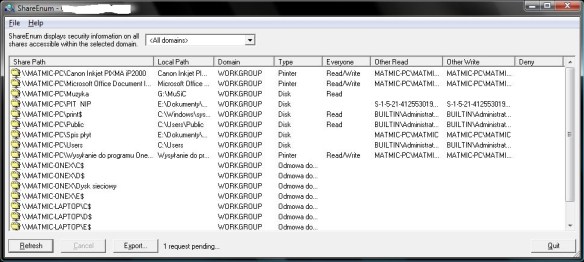
An aspect of Windows NT/2000/XP network security that’s often overlooked is file shares. A common security flaw occurs when users define file shares with lax security, allowing unauthorized users to see sensitive files.

There are no built-in tools to list shares viewable on a network and their security settings, but ShareEnum fills the void and allows you to lock down file shares in your network.

When you run ShareEnum it uses NetBIOS enumeration to scan all the computers within the domains accessible to it, showing file and print shares and their security settings. Because only a domain administrator has the ability to view all network resources, ShareEnum is most effective when you run it from a domain administrator account.
shareenum

How It Works

ShareEnum uses WNetEnumResource to enumerate domains and the computers within. them and NetShareEnum to enumerate shares on computers.

download

TCPView v3.05

Introduction

TCPView is a Windows program that will show you detailed listings of all TCP and UDP endpoints on your system, including the local and remote addresses and state of TCP connections. On Windows Server 2008, Vista, and XP, TCPView also reports the name of the process that owns the endpoint.

TCPView provides a more informative and conveniently presented subset of the Netstat program that ships with Windows. The TCPView download includes Tcpvcon, a command-line version with the same functionality.

tcpview

Using TCPView

When you start TCPView it will enumerate all active TCP and UDP endpoints, resolving all IP addresses to their domain name versions. You can use a toolbar button or menu item to toggle the display of resolved names. On Windows XP systems, TCPView shows the name of the process that owns each endpoint.

By default, TCPView updates every second, but you can use the Options|Refresh Rate menu item to change the rate. Endpoints that change state from one update to the next are highlighted in yellow; those that are deleted are shown in red, and new endpoints are shown in green.

You can close established TCP/IP connections (those labeled with a state of ESTABLISHED) by selecting File|Close Connections, or by right-clicking on a connection and choosing Close Connections from the resulting context menu.
You can save TCPView’s output window to a file using the Save menu item.

Using Tcpvcon

Tcpvcon usage is similar to that of the built-in Windows netstat utility:
Usage: tcpvcon [-a] [-c] [-n] [process name or PID]

-a Show all endpoints (default is to show established TCP connections).
-c Print output as CSV.
-n Don’t resolve addresses..

Microsoft TCPView KB Article

This Microsoft KB article references TCPView:
816944: “Unexpected Error 0x8ffe2740 Occurred” Error Message When You Try to Start a Web Site

download

Whois v1.14

Introduction

Whois performs the registration record for the domain name or IP address that you specify.

Usage

Usage: whois [-v] domainname [whois.server]

-v Print whois information for referrals
Domainname can be either a DNS name (e.g. http://www.sysinternals.com) or IP address (e.g. 66.193.254.46).

download

Basic powershell cmdlet sharepoint

[siteorigin_widget class=”WordAds_Sidebar_Widget”][/siteorigin_widget]
[siteorigin_widget class=”WordAds_Sidebar_Widget”][/siteorigin_widget]

Basic powershell cmdlet sharepoint

Below are the very basic powershell cmdlet for sharepoint which would be very helpful.

Get-Command -Noun SP*
Get-Help Get-SPSite
Get-Help Get-SPSite -Examples
PS C:\Users\de.prasad.adm> Get-Command -Noun SPSite

CommandType Name ModuleName


Backup-SPSite Microsoft.SharePoint.PowerShell
Copy-SPSite Microsoft.SharePoint.PowerShell
Get-SPSite Microsoft.SharePoint.PowerShell
Move-SPSite Microsoft.SharePoint.PowerShell
New-SPSite Microsoft.SharePoint.PowerShell
Remove-SPSite Microsoft.SharePoint.PowerShell
Repair-SPSite Microsoft.SharePoint.PowerShell
Restore-SPSite Microsoft.SharePoint.PowerShell
Set-SPSite Microsoft.SharePoint.PowerShell
Test-SPSite Microsoft.SharePoint.PowerShell
Upgrade-SPSite Microsoft.SharePoint.PowerShell
PS C:\Users\de.prasad.adm> Get-Command -Noun SPWeb

CommandType Name ModuleName


Export-SPWeb Microsoft.SharePoint.PowerShell
Get-SPWeb Microsoft.SharePoint.PowerShell
Import-SPWeb Microsoft.SharePoint.PowerShell
New-SPWeb Microsoft.SharePoint.PowerShell
Remove-SPWeb Microsoft.SharePoint.PowerShell
Set-SPWeb Microsoft.SharePoint.PowerShell
PS C:\Users\de.prasad.adm> Get-Command -Noun SPWebApplication

CommandType Name ModuleName


Convert-SPWebApplication Microsoft.SharePoint.PowerShell
Get-SPWebApplication Microsoft.SharePoint.PowerShell
New-SPWebApplication Microsoft.SharePoint.PowerShell
Remove-SPWebApplication Microsoft.SharePoint.PowerShell
Set-SPWebApplication Microsoft.SharePoint.PowerShell
PS C:\Users\de.prasad.adm> Get-Command -Noun SPServiceApplication

CommandType Name ModuleName


Get-SPServiceApplication Microsoft.SharePoint.PowerShell
Publish-SPServiceApplication Microsoft.SharePoint.PowerShell
Remove-SPServiceApplication Microsoft.SharePoint.PowerShell
Set-SPServiceApplication Microsoft.SharePoint.PowerShell
Unpublish-SPServiceApplication Microsoft.SharePoint.PowerShell
PS C:\Users\de.prasad.adm> Get-Command -Noun SPServiceApplicationPool

CommandType Name ModuleName


Get-SPServiceApplicationPool Microsoft.SharePoint.PowerShell
Cmdlet New-SPServiceApplicationPool Microsoft.SharePoint.PowerShell
Cmdlet Remove-SPServiceApplicationPool Microsoft.SharePoint.PowerShell
Cmdlet Set-SPServiceApplicationPool Microsoft.SharePoint.PowerShell
PS C:\Users\de.prasad.adm> Get-Command -Noun SPContentDatabase

CommandType Name ModuleName


Cmdlet Dismount-SPContentDatabase Microsoft.SharePoint.PowerShell
Get-SPContentDatabase Microsoft.SharePoint.PowerShell
Cmdlet Mount-SPContentDatabase Microsoft.SharePoint.PowerShell
Cmdlet New-SPContentDatabase Microsoft.SharePoint.PowerShell
Cmdlet Remove-SPContentDatabase Microsoft.SharePoint.PowerShell
Cmdlet Set-SPContentDatabase Microsoft.SharePoint.PowerShell
Cmdlet Test-SPContentDatabase Microsoft.SharePoint.PowerShell
Cmdlet Upgrade-SPContentDatabase Microsoft.SharePoint.PowerShell
PS C:\Users\de.prasad.adm> Get-Command -Noun SPDatabase

CommandType Name ModuleName


Get-SPDatabase Microsoft.SharePoint.PowerShell
PS C:\Users\de.prasad.adm> Get-Command -Noun SPManagedAccount

CommandType Name ModuleName


Get-SPManagedAccount Microsoft.SharePoint.PowerShell
New-SPManagedAccount Microsoft.SharePoint.PowerShell
Remove-SPManagedAccount Microsoft.SharePoint.PowerShell
Set-SPManagedAccount Microsoft.SharePoint.PowerShell
PS C:\Users\de.prasad.adm> Get-Command -Noun STimerJob
PS C:\Users\de.prasad.adm> Get-Command -Noun SPTimerJob

CommandType Name ModuleName


Disable-SPTimerJob Microsoft.SharePoint.PowerShell
Enable-SPTimerJob Microsoft.SharePoint.PowerShell
Get-SPTimerJob Microsoft.SharePoint.PowerShell
Set-SPTimerJob Microsoft.SharePoint.PowerShell
Start-SPTimerJob Microsoft.SharePoint.PowerShell
PS C:\Users\de.prasad.adm> Get-Command -Noun SPUser

CommandType Name ModuleName


Get-SPUser Microsoft.SharePoint.PowerShell
Move-SPUser Microsoft.SharePoint.PowerShell
New-SPUser Microsoft.SharePoint.PowerShell
Remove-SPUser Microsoft.SharePoint.PowerShell
Set-SPUser Microsoft.SharePoint.PowerShell
PS C:\Users\de.prasad.adm> Get-Command -Noun WebApplication

CommandType Name ModuleName


ConvertTo-WebApplication WebAdministration
Get-WebApplication WebAdministration
New-WebApplication WebAdministration
Remove-WebApplication WebAdministration
PS C:\Users\de.prasad.adm> Get-Command -Noun SPProcessAccount

CommandType Name ModuleName


Get-SPProcessAccount Microsoft.SharePoint.PowerShell

PS C:\Users\de.prasad.adm> Get-Command -Verb Get

Get-PfxCertificate Microsoft.PowerShell.Security
Get-PfxData PKI
Get-Process Microsoft.PowerShell.Management
Get-PSBreakpoint Microsoft.PowerShell.Utility
Get-PSCallStack Microsoft.PowerShell.Utility
Get-PSDrive Microsoft.PowerShell.Management
Get-PSProvider Microsoft.PowerShell.Management
Get-PSSession Microsoft.PowerShell.Core
Get-PSSessionConfiguration Microsoft.PowerShell.Core
Get-PSSnapin Microsoft.PowerShell.Core
Get-Random Microsoft.PowerShell.Utility
Get-ScheduledJob PSScheduledJob
Get-ScheduledJobOption PSScheduledJob
Get-SecureBootPolicy SecureBoot
Get-SecureBootUEFI SecureBoot
Get-Service Microsoft.PowerShell.Management
Get-SPAccessServiceApplication Microsoft.SharePoint.PowerShell
Get-SPAccessServicesApplication Microsoft.SharePoint.PowerShell
Get-SPAccessServicesDatabase Microsoft.SharePoint.PowerShell
Get-SPAccessServicesDatabaseServer Microsoft.SharePoint.PowerShell
Get-SPAccessServicesDatabaseServerGroup Microsoft.SharePoint.PowerShell
Get-SPAccessServicesDatabaseServerGroupMapping Microsoft.SharePoint.PowerShell
Get-SPAlternateURL Microsoft.SharePoint.PowerShell
Get-SPAppAcquisitionConfiguration Microsoft.SharePoint.PowerShell
Get-SPAppAutoProvisionConnection Microsoft.SharePoint.PowerShell
Get-SPAppDeniedEndpointList Microsoft.SharePoint.PowerShell
Get-SPAppDisablingConfiguration Microsoft.SharePoint.PowerShell
Get-SPAppDomain Microsoft.SharePoint.PowerShell
Get-SPAppHostingQuotaConfiguration Microsoft.SharePoint.PowerShell
Get-SPAppInstance Microsoft.SharePoint.PowerShell
Get-SPAppPrincipal Microsoft.SharePoint.PowerShell
Get-SPAppScaleProfile Microsoft.SharePoint.PowerShell
Get-SPAppSiteSubscriptionName Microsoft.SharePoint.PowerShell
Get-SPAppStateSyncLastRunTime Microsoft.SharePoint.PowerShell
Get-SPAppStateUpdateInterval Microsoft.SharePoint.PowerShell
Get-SPAppStoreConfiguration Microsoft.SharePoint.PowerShell
Get-SPAuthenticationProvider Microsoft.SharePoint.PowerShell
Get-SPAuthenticationRealm Microsoft.SharePoint.PowerShell
Get-SPBackupHistory Microsoft.SharePoint.PowerShell
Get-SPBingMapsBlock Microsoft.SharePoint.PowerShell
Get-SPBingMapsKey Microsoft.SharePoint.PowerShell
Get-SPBrowserCustomerExperienceImprovementProgram Microsoft.SharePoint.PowerShell
Get-SPBusinessDataCatalogEntityNotificationWeb Microsoft.SharePoint.PowerShell
Get-SPBusinessDataCatalogMetadataObject Microsoft.SharePoint.PowerShell
Get-SPBusinessDataCatalogThrottleConfig Microsoft.SharePoint.PowerShell
Get-SPCertificateAuthority Microsoft.SharePoint.PowerShell
Get-SPClaimProvider Microsoft.SharePoint.PowerShell
Get-SPClaimProviderManager Microsoft.SharePoint.PowerShell
Get-SPClaimTypeEncoding Microsoft.SharePoint.PowerShell
Get-SPContentDatabase Microsoft.SharePoint.PowerShell
Get-SPContentDeploymentJob Microsoft.SharePoint.PowerShell
Get-SPContentDeploymentPath Microsoft.SharePoint.PowerShell
Get-SPCustomLayoutsPage Microsoft.SharePoint.PowerShell
Get-SPDatabase Microsoft.SharePoint.PowerShell
Get-SPDataConnectionFile Microsoft.SharePoint.PowerShell
Get-SPDataConnectionFileDependent Microsoft.SharePoint.PowerShell
Get-SPDeletedSite Microsoft.SharePoint.PowerShell
Get-SPDesignerSettings Microsoft.SharePoint.PowerShell
Get-SPDiagnosticConfig Microsoft.SharePoint.PowerShell
Get-SPDiagnosticsPerformanceCounter Microsoft.SharePoint.PowerShell
Get-SPDiagnosticsProvider Microsoft.SharePoint.PowerShell
Get-SPDistributedCacheClientSetting Microsoft.SharePoint.PowerShell
Get-SPEduServiceSetting Microsoft.SharePoint.PowerShell
Get-SPEnterpriseSearchAdministrationComponent Microsoft.SharePoint.PowerShell
Get-SPEnterpriseSearchComponent Microsoft.SharePoint.PowerShell
Get-SPEnterpriseSearchContentEnrichmentConfigur… Microsoft.SharePoint.PowerShell
Get-SPEnterpriseSearchCrawlContentSource Microsoft.SharePoint.PowerShell
Get-SPEnterpriseSearchCrawlCustomConnector Microsoft.SharePoint.PowerShell
Get-SPEnterpriseSearchCrawlDatabase Microsoft.SharePoint.PowerShell
Get-SPEnterpriseSearchCrawlExtension Microsoft.SharePoint.PowerShell
Get-SPEnterpriseSearchCrawlLogReadPermission Microsoft.SharePoint.PowerShell
Get-SPEnterpriseSearchCrawlMapping Microsoft.SharePoint.PowerShell
Get-SPEnterpriseSearchCrawlRule Microsoft.SharePoint.PowerShell
Get-SPEnterpriseSearchFileFormat Microsoft.SharePoint.PowerShell
Get-SPEnterpriseSearchHostController Microsoft.SharePoint.PowerShell
Get-SPEnterpriseSearchLanguageResourcePhrase Microsoft.SharePoint.PowerShell
Get-SPEnterpriseSearchLinguisticComponentsStatus Microsoft.SharePoint.PowerShell
Get-SPEnterpriseSearchLinksDatabase Microsoft.SharePoint.PowerShell
Get-SPEnterpriseSearchMetadataCategory Microsoft.SharePoint.PowerShell
Get-SPEnterpriseSearchMetadataCrawledProperty Microsoft.SharePoint.PowerShell
Get-SPEnterpriseSearchMetadataManagedProperty Microsoft.SharePoint.PowerShell
Get-SPEnterpriseSearchMetadataMapping Microsoft.SharePoint.PowerShell
Get-SPEnterpriseSearchOwner Microsoft.SharePoint.PowerShell
Get-SPEnterpriseSearchPropertyRule Microsoft.SharePoint.PowerShell
Get-SPEnterpriseSearchPropertyRuleCollection Microsoft.SharePoint.PowerShell
Get-SPEnterpriseSearchQueryAndSiteSettingsService Microsoft.SharePoint.PowerShell
Get-SPEnterpriseSearchQueryAndSiteSettingsServi… Microsoft.SharePoint.PowerShell
Get-SPEnterpriseSearchQueryAuthority Microsoft.SharePoint.PowerShell
Get-SPEnterpriseSearchQueryDemoted Microsoft.SharePoint.PowerShell
Get-SPEnterpriseSearchQueryKeyword Microsoft.SharePoint.PowerShell
Get-SPEnterpriseSearchQueryScope Microsoft.SharePoint.PowerShell
Get-SPEnterpriseSearchQueryScopeRule Microsoft.SharePoint.PowerShell
Get-SPEnterpriseSearchQuerySpellingCorrection Microsoft.SharePoint.PowerShell
Get-SPEnterpriseSearchQuerySuggestionCandidates Microsoft.SharePoint.PowerShell
Get-SPEnterpriseSearchRankingModel Microsoft.SharePoint.PowerShell
Get-SPEnterpriseSearchResultItemType Microsoft.SharePoint.PowerShell
Get-SPEnterpriseSearchResultSource Microsoft.SharePoint.PowerShell
Get-SPEnterpriseSearchSecurityTrimmer Microsoft.SharePoint.PowerShell
Get-SPEnterpriseSearchService Microsoft.SharePoint.PowerShell
Get-SPEnterpriseSearchServiceApplication Microsoft.SharePoint.PowerShell
Get-SPEnterpriseSearchServiceApplicationBackupS… Microsoft.SharePoint.PowerShell
Get-SPEnterpriseSearchServiceApplicationProxy Microsoft.SharePoint.PowerShell
Get-SPEnterpriseSearchServiceInstance Microsoft.SharePoint.PowerShell
Get-SPEnterpriseSearchSiteHitRule Microsoft.SharePoint.PowerShell
Get-SPEnterpriseSearchStatus Microsoft.SharePoint.PowerShell
Get-SPEnterpriseSearchTopology Microsoft.SharePoint.PowerShell
Get-SPEnterpriseSearchVssDataPath Microsoft.SharePoint.PowerShell
Get-SPExcelBIServer Microsoft.SharePoint.PowerShell
Get-SPExcelBlockedFileType Microsoft.SharePoint.PowerShell
Get-SPExcelDataConnectionLibrary Microsoft.SharePoint.PowerShell
Get-SPExcelDataProvider Microsoft.SharePoint.PowerShell
Get-SPExcelFileLocation Microsoft.SharePoint.PowerShell
Get-SPExcelServiceApplication Microsoft.SharePoint.PowerShell
Get-SPExcelUserDefinedFunction Microsoft.SharePoint.PowerShell
Get-SPFarm Microsoft.SharePoint.PowerShell
Get-SPFarmConfig Microsoft.SharePoint.PowerShell
Get-SPFeature Microsoft.SharePoint.PowerShell
Get-SPHealthAnalysisRule Microsoft.SharePoint.PowerShell
Get-SPHelpCollection Microsoft.SharePoint.PowerShell
Get-SPInfoPathFormsService Microsoft.SharePoint.PowerShell
Get-SPInfoPathFormTemplate Microsoft.SharePoint.PowerShell
Get-SPInfoPathUserAgent Microsoft.SharePoint.PowerShell
Get-SPInfoPathWebServiceProxy Microsoft.SharePoint.PowerShell
Get-SPInternalAppStateSyncLastRunTime Microsoft.SharePoint.PowerShell
Get-SPInternalAppStateUpdateInterval Microsoft.SharePoint.PowerShell
Get-SPIRMSettings Microsoft.SharePoint.PowerShell
Get-SPLogEvent Microsoft.SharePoint.PowerShell
Get-SPLogLevel Microsoft.SharePoint.PowerShell
Get-SPManagedAccount Microsoft.SharePoint.PowerShell
Get-SPManagedPath Microsoft.SharePoint.PowerShell
Get-SPMetadataServiceApplication Microsoft.SharePoint.PowerShell
Get-SPMetadataServiceApplicationProxy Microsoft.SharePoint.PowerShell
Get-SPMobileMessagingAccount Microsoft.SharePoint.PowerShell
Get-SPODataConnectionSetting Microsoft.SharePoint.PowerShell
Get-SPODataConnectionSettingMetadata Microsoft.SharePoint.PowerShell
Get-SPOfficeStoreAppsDefaultActivation Microsoft.SharePoint.PowerShell
Get-SPPendingUpgradeActions Microsoft.SharePoint.PowerShell
Get-SPPerformancePointServiceApplication Microsoft.SharePoint.PowerShell
Get-SPPerformancePointServiceApplicationTrusted… Microsoft.SharePoint.PowerShell
Get-SPPluggableSecurityTrimmer Microsoft.SharePoint.PowerShell
Get-SPProcessAccount Microsoft.SharePoint.PowerShell
Get-SPProduct Microsoft.SharePoint.PowerShell
Get-SPProfileLeader Microsoft.SharePoint.PowerShell
Get-SPProfileServiceApplicationSecurity Microsoft.SharePoint.PowerShell
Get-SPProjectDatabaseQuota Microsoft.SharePoint.PowerShell
Get-SPProjectDatabaseState Microsoft.SharePoint.PowerShell
Get-SPProjectEnterpriseProjectTaskSync Microsoft.SharePoint.PowerShell
Get-SPProjectLogLevelManager Microsoft.SharePoint.PowerShell
Get-SPProjectOdataConfiguration Microsoft.SharePoint.PowerShell
Get-SPProjectPCSSettings Microsoft.SharePoint.PowerShell
Get-SPProjectPermissionMode Microsoft.SharePoint.PowerShell
Get-SPProjectQueueSettings Microsoft.SharePoint.PowerShell
Get-SPProjectWebInstance Microsoft.SharePoint.PowerShell
Get-SPRequestManagementSettings Microsoft.SharePoint.PowerShell
Get-SPRoutingMachineInfo Microsoft.SharePoint.PowerShell
Get-SPRoutingMachinePool Microsoft.SharePoint.PowerShell
Get-SPRoutingRule Microsoft.SharePoint.PowerShell
Get-SPRSDatabase Microsoft.SharePoint.PowerShell
Get-SPRSDatabaseCreationScript Microsoft.SharePoint.PowerShell
Get-SPRSDatabaseRightsScript Microsoft.SharePoint.PowerShell
Get-SPRSDatabaseUpgradeScript Microsoft.SharePoint.PowerShell
Get-SPRSExtension Microsoft.SharePoint.PowerShell
Get-SPRSProxyUrl Microsoft.SharePoint.PowerShell
Get-SPRSServiceApplication Microsoft.SharePoint.PowerShell
Get-SPRSServiceApplicationProxy Microsoft.SharePoint.PowerShell
Get-SPRSServiceApplicationServers Microsoft.SharePoint.PowerShell
Get-SPRSSite Microsoft.SharePoint.PowerShell
Get-SPScaleOutDatabase Microsoft.SharePoint.PowerShell
Get-SPScaleOutDatabaseDataState Microsoft.SharePoint.PowerShell
Get-SPScaleOutDatabaseInconsistency Microsoft.SharePoint.PowerShell
Get-SPScaleOutDatabaseLogEntry Microsoft.SharePoint.PowerShell
Get-SPSecureStoreApplication Microsoft.SharePoint.PowerShell
Get-SPSecureStoreSystemAccount Microsoft.SharePoint.PowerShell
Get-SPSecurityTokenServiceConfig Microsoft.SharePoint.PowerShell
Get-SPServer Microsoft.SharePoint.PowerShell
Get-SPServerScaleOutDatabase Microsoft.SharePoint.PowerShell
Get-SPServerScaleOutDatabaseDataState Microsoft.SharePoint.PowerShell
Get-SPServerScaleOutDatabaseInconsistency Microsoft.SharePoint.PowerShell
Get-SPServerScaleOutDatabaseLogEntry Microsoft.SharePoint.PowerShell
Get-SPServiceApplication Microsoft.SharePoint.PowerShell
Get-SPServiceApplicationEndpoint Microsoft.SharePoint.PowerShell
Get-SPServiceApplicationPool Microsoft.SharePoint.PowerShell
Get-SPServiceApplicationProxy Microsoft.SharePoint.PowerShell
Get-SPServiceApplicationProxyGroup Microsoft.SharePoint.PowerShell
Get-SPServiceApplicationSecurity Microsoft.SharePoint.PowerShell
Get-SPServiceContext Microsoft.SharePoint.PowerShell
Get-SPServiceHostConfig Microsoft.SharePoint.PowerShell
Get-SPServiceInstance Microsoft.SharePoint.PowerShell
Get-SPSessionStateService Microsoft.SharePoint.PowerShell
Get-SPShellAdmin Microsoft.SharePoint.PowerShell
Get-SPSite Microsoft.SharePoint.PowerShell
Get-SPSiteAdministration Microsoft.SharePoint.PowerShell
Get-SPSiteSubscription Microsoft.SharePoint.PowerShell
Get-SPSiteSubscriptionConfig Microsoft.SharePoint.PowerShell
Get-SPSiteSubscriptionEdiscoveryHub Microsoft.SharePoint.PowerShell
Get-SPSiteSubscriptionEdiscoverySearchScope Microsoft.SharePoint.PowerShell
Get-SPSiteSubscriptionFeaturePack Microsoft.SharePoint.PowerShell
Get-SPSiteSubscriptionIRMConfig Microsoft.SharePoint.PowerShell
Get-SPSiteSubscriptionMetadataConfig Microsoft.SharePoint.PowerShell
Get-SPSiteUpgradeSessionInfo Microsoft.SharePoint.PowerShell
Get-SPSiteURL Microsoft.SharePoint.PowerShell
Get-SPSolution Microsoft.SharePoint.PowerShell
Get-SPStateServiceApplication Microsoft.SharePoint.PowerShell
Get-SPStateServiceApplicationProxy Microsoft.SharePoint.PowerShell
Get-SPStateServiceDatabase Microsoft.SharePoint.PowerShell
Get-SPTaxonomySession Microsoft.SharePoint.PowerShell
Get-SPThrottlingRule Microsoft.SharePoint.PowerShell
Get-SPTimerJob Microsoft.SharePoint.PowerShell
Get-SPTopologyServiceApplication Microsoft.SharePoint.PowerShell
Get-SPTopologyServiceApplicationProxy Microsoft.SharePoint.PowerShell
Get-SPTranslationThrottlingSetting Microsoft.SharePoint.PowerShell
Get-SPTrustedIdentityTokenIssuer Microsoft.SharePoint.PowerShell
Get-SPTrustedRootAuthority Microsoft.SharePoint.PowerShell
Get-SPTrustedSecurityTokenIssuer Microsoft.SharePoint.PowerShell
Get-SPTrustedServiceTokenIssuer Microsoft.SharePoint.PowerShell
Get-SPUpgradeActions Microsoft.SharePoint.PowerShell
Get-SPUsageApplication Microsoft.SharePoint.PowerShell
Get-SPUsageDefinition Microsoft.SharePoint.PowerShell
Get-SPUsageService Microsoft.SharePoint.PowerShell
Get-SPUser Microsoft.SharePoint.PowerShell
Get-SPUserLicense Microsoft.SharePoint.PowerShell
Get-SPUserLicenseMapping Microsoft.SharePoint.PowerShell
Get-SPUserLicensing Microsoft.SharePoint.PowerShell
Get-SPUserSettingsProvider Microsoft.SharePoint.PowerShell
Get-SPUserSettingsProviderManager Microsoft.SharePoint.PowerShell
Get-SPUserSolution Microsoft.SharePoint.PowerShell
Get-SPVisioExternalData Microsoft.SharePoint.PowerShell
Get-SPVisioPerformance Microsoft.SharePoint.PowerShell
Get-SPVisioSafeDataProvider Microsoft.SharePoint.PowerShell
Get-SPVisioServiceApplication Microsoft.SharePoint.PowerShell
Get-SPVisioServiceApplicationProxy Microsoft.SharePoint.PowerShell
Get-SPWeb Microsoft.SharePoint.PowerShell
Get-SPWebApplication Microsoft.SharePoint.PowerShell
Get-SPWebApplicationAppDomain Microsoft.SharePoint.PowerShell
Get-SPWebApplicationHttpThrottlingMonitor Microsoft.SharePoint.PowerShell
Get-SPWebPartPack Microsoft.SharePoint.PowerShell
Get-SPWebTemplate Microsoft.SharePoint.PowerShell
Get-SPWOPIBinding Microsoft.SharePoint.PowerShell
Get-SPWOPISuppressionSetting Microsoft.SharePoint.PowerShell
Get-SPWOPIZone Microsoft.SharePoint.PowerShell
Get-SPWorkflowConfig Microsoft.SharePoint.PowerShell
Get-SPWorkflowServiceApplicationProxy Microsoft.SharePoint.PowerShell
Get-Tpm TrustedPlatformModule
Get-TpmEndorsementKeyInfo TrustedPlatformModule
Get-TpmSupportedFeature TrustedPlatformModule
Get-TraceSource Microsoft.PowerShell.Utility
Get-Transaction Microsoft.PowerShell.Management
Get-TroubleshootingPack TroubleshootingPack
Get-TypeData Microsoft.PowerShell.Utility
Get-UICulture Microsoft.PowerShell.Utility
Get-Unique Microsoft.PowerShell.Utility
Get-Variable Microsoft.PowerShell.Utility
Get-WebAppDomain WebAdministration
Get-WebApplication WebAdministration
Get-WebApplicationMonitoringStatus Microsoft.MonitoringAgent.Pow…
Get-WebAppPoolState WebAdministration
Get-WebBinding WebAdministration
Get-WebCentralCertProvider WebAdministration
Get-WebConfigFile WebAdministration
Get-WebConfiguration WebAdministration
Get-WebConfigurationBackup WebAdministration
Get-WebConfigurationLocation WebAdministration
Get-WebConfigurationLock WebAdministration
Get-WebConfigurationProperty WebAdministration
Get-WebFilePath WebAdministration
Get-WebGlobalModule WebAdministration
Get-WebHandler WebAdministration
Get-WebItemState WebAdministration
Get-WebManagedModule WebAdministration
Get-WebRequest WebAdministration
Get-Website WebAdministration
Get-WebsiteState WebAdministration
Get-WebURL WebAdministration
Get-WebVirtualDirectory WebAdministration
Get-WheaMemoryPolicy Whea
Get-WIMBootEntry Dism
Get-WinAcceptLanguageFromLanguageListOptOut International
Get-WinCultureFromLanguageListOptOut International
Get-WinDefaultInputMethodOverride International
Get-WindowsDriver Dism
Get-WindowsEdition Dism
Get-WindowsErrorReporting WindowsErrorReporting
Get-WindowsImage Dism
Get-WindowsImageContent Dism
Get-WindowsOptionalFeature Dism
Get-WindowsPackage Dism
Get-WindowsSearchSetting WindowsSearch
Get-WinEvent Microsoft.PowerShell.Diagnostics
Get-WinHomeLocation International
Get-WinLanguageBarOption International
Get-WinSystemLocale International
Get-WinUILanguageOverride International
Get-WinUserLanguageList International
Get-WmiObject Microsoft.PowerShell.Management
Get-WSManCredSSP Microsoft.WSMan.Management
Get-WSManInstance Microsoft.WSMan.Management

[siteorigin_widget class=”WordAds_Sidebar_Widget”][/siteorigin_widget]
[siteorigin_widget class=”WordAds_Sidebar_Widget”][/siteorigin_widget]