Processing this item failed because of an unknown error when trying to parse its contents Crawl error SharePoint2013

There is crawling error in the Craw log of a SharePoint 2013 environment.

Processing this item failed because of an unknown error when trying to parse its contents. (Error parsing document ‘http://sharepoint.contoso.com/Project/abcd/Q_M/ABX/SitePages/Homepage.aspx’. Sandbox worker pool is closed.; ; SearchID = 820E86ZD-5252-4G5F-AK9U-2096ZV3L56PP )

In order to fix this you can try to perform the following action plan:

Open “Local Policies”

Click on “User rights assignment”

User rights assignment in local security policy

User rights assignment in local security policy

Make sure that the search service account has the following rights:

“Replace a process level token”
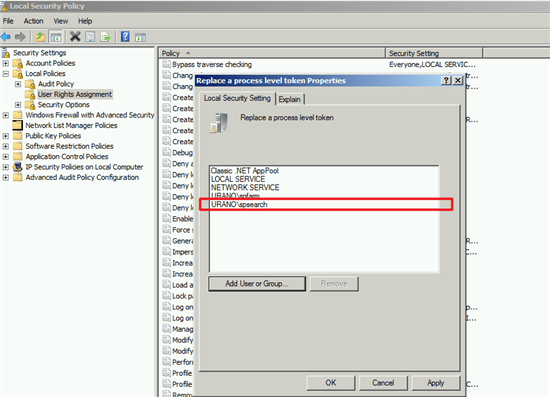
Replace Process Level Token Properties

Replace Process Level Token Properties

“Adjust memory quotas for a process”

adjust memory quotas process properties securitypolicy

adjust memory quotas process properties securitypolicy

“Impersonate a client after authentication”

Impersonate client authentication properties securitypolicy

Impersonate client authentication properties security policy

Please make sure that the policies don’t get changed afterwards.

After implementing the above changes please run a clear configuration cache

After clearing the cache, start a full crawl and the errors should be gone.

Partial Index Reset of a single content source

Partial Index Reset of a single content source

This script will remove and re-add your content source‘s start addresses.

SharePoint will more or less rebuild the index for these sources, when the next full crawl is started.

$sourceName = "Local SharePoint sites"
$SSA = Get-SPEnterpriseSearchServiceApplication
$source = Get-SPEnterpriseSearchCrawlContentSource -Identity $sourceName -SearchApplication $SSA
$startaddresses = $source.StartAddresses | ForEach-Object { $_.OriginalString }
$source.StartAddresses.Clear()
ForEach ($address in $startaddresses ){ $source.StartAddresses.Add($address) }

Similar Post

Item crawled error when attempting to download item example aspx file SharePoint

Error

SharePoint Crawl Log Error: The SharePoint item being crawled returned an error when attempting to download the item for example .aspx files

Solution :

  1. Open Regedit on your search server/s
  2. Navigate to this registry key: HKEY_LOCAL_MACHINESOFTWAREMicrosoftOffice  Server14.0SearchGlobalGathering Manager
  3. Change Value “UserAgent” from  “MSIE 4.01”to“MSIE 8.0”
  4. Restart the SharePoint Search Service.
  5. Open a SharePoint PowerShell
    Get-SPSessionStateService
    If this returns false then we need to deploy one
    Enable-SPSessionStateService -DatabaseName “NameOfDatabase”
    Now lets go back and re-run that crawl